CMMS Implementation Checklist: How to Prepare Your Team, Data, and Workflows
Executive Summary
This CMMS implementation checklist helps maintenance leaders prepare their teams, data, workflows, training plans, and adoption strategies before launch. Implementing a computerized maintenance management system is more than a software project. Instead, it is an operational change initiative that affects technicians, planners, supervisors, inventory teams, IT stakeholders, and leadership.
Organizations that prepare their data, workflows, training plans, and adoption strategy before launch are far more likely to achieve long-term success. As a result, this guide provides a practical CMMS implementation checklist that maintenance leaders can use to prepare for rollout, avoid common mistakes, and build a foundation for measurable maintenance improvement.
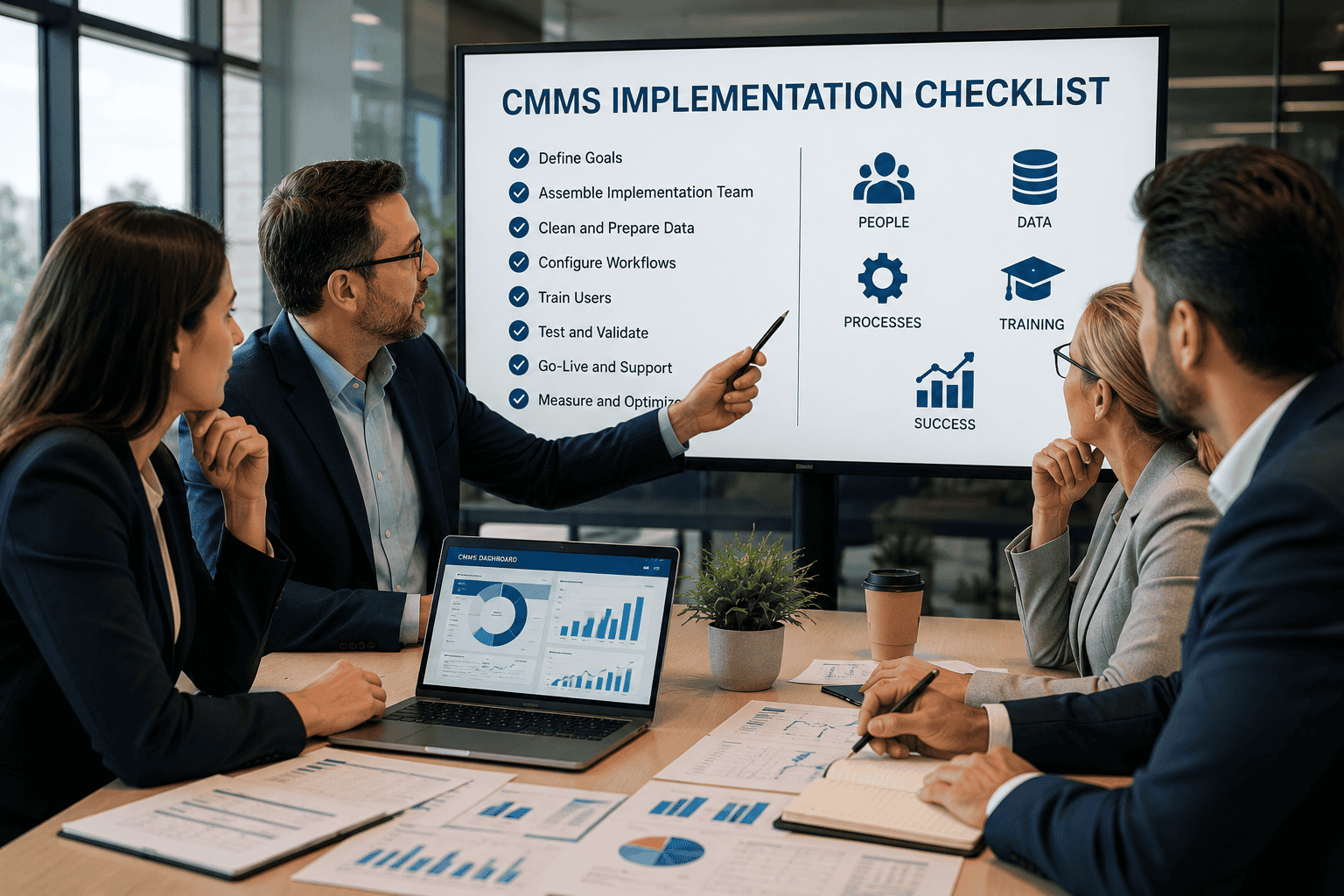
CMMS Implementation Quick Checklist
Before launch, maintenance teams should complete the following steps. However, go-live should not be treated as the end of the project. Instead, it should be treated as the beginning of adoption, optimization, and continuous improvement.
| Checklist Step | Why It Matters |
|---|---|
| Define goals | Clarifies what the CMMS should improve, such as downtime, visibility, PM compliance, or reporting. |
| Assign an implementation team | Keeps maintenance, operations, inventory, IT, and leadership aligned throughout the rollout. |
| Clean asset data | Improves reporting accuracy, work order history, and preventive maintenance scheduling. |
| Review PM schedules | Prevents outdated, duplicate, or ineffective PM tasks from being migrated into the new system. |
| Configure work order workflows | Ensures requests, approvals, assignments, priorities, and completions reflect real maintenance processes. |
| Organize inventory data | Supports faster repairs, better purchasing decisions, and stronger cost control. |
| Define user roles | Improves security, simplifies training, and reduces confusion after launch. |
| Train employees | Builds user confidence and helps teams adopt the CMMS consistently. |
| Test real-world scenarios | Identifies problems before they affect the full maintenance team. |
| Establish post-launch support | Helps users resolve issues quickly and prevents teams from returning to spreadsheets or paper processes. |
What Is CMMS Implementation?
CMMS implementation is the process of configuring, populating, testing, and launching CMMS software within an organization. A successful implementation aligns software configuration with real maintenance processes, asset structures, reporting requirements, inventory needs, and user responsibilities.
However, the objective is not simply to install software. The objective is to create a system that technicians and managers use consistently to manage maintenance work, improve visibility, and support better decisions. Therefore, the right CMMS implementation checklist should address people, processes, data, training, and long-term adoption.
Why a CMMS Implementation Checklist Matters
Many CMMS projects struggle because organizations focus heavily on software configuration while underestimating data preparation, workflow design, and user adoption. As a result, teams may launch the system only to discover that asset records are incomplete, workflows are confusing, or technicians are not confident using the software.
A checklist creates structure, keeps stakeholders aligned, and reduces the risk of critical tasks being overlooked. In addition, it provides a repeatable framework that can be used across multiple facilities or future system upgrades. For broader maintenance and reliability best practices, organizations can also review resources from ReliabilityWeb and SMRP.
CMMS Implementation Checklist: 12 Steps for a Successful Rollout
The following steps provide a practical roadmap for planning, configuring, testing, and launching a CMMS. While every organization is different, these implementation steps help reduce risk and improve adoption.
1. Define Business Goals Before Configuration
Start by identifying the outcomes the CMMS should support. Common goals include reducing downtime, improving preventive maintenance compliance, increasing work order visibility, controlling inventory costs, creating asset histories, and standardizing maintenance practices.
However, effective goals should be specific and measurable. Rather than saying “improve maintenance,” define targets such as reducing overdue preventive maintenance tasks by 25% or increasing planned maintenance percentage within six months. As a result, the implementation team can configure the system around outcomes that matter.
2. Build the Right Implementation Team
Successful implementations involve representatives from maintenance, operations, inventory, IT, and leadership. Technician participation is particularly important because technicians are the primary users of the system.
Their feedback helps ensure that workflows are practical, mobile-friendly, and aligned with daily maintenance activities. In addition, executive sponsorship is important because leadership support helps maintain momentum when competing priorities emerge.
3. Clean and Standardize Asset Data
Asset data quality directly affects reporting accuracy, preventive maintenance scheduling, and work order history. Therefore, teams should review existing records for duplicates, inconsistent naming conventions, missing locations, and incomplete details.
Before importing information, establish naming standards, location structures, asset categories, and criticality ratings. In addition, organizations should focus first on critical assets that have the greatest operational impact. For teams building long-term asset visibility, see related resources on asset management software.
4. Create an Asset Hierarchy
A well-structured asset hierarchy makes reporting and analysis significantly easier. Parent-child relationships help maintenance teams understand how systems are connected and where failures originate.
For example, buildings, production lines, HVAC systems, pumps, motors, and supporting components should be organized logically so technicians can quickly find information. As a result, teams can improve reporting, troubleshooting, and asset history accuracy.
5. Prepare Work Order Workflows
Work orders are the operational backbone of a CMMS. Therefore, organizations should define how requests are submitted, approved, prioritized, assigned, completed, and reviewed before configuration begins.
Determine which fields are required, what information technicians must capture, and how priorities will be assigned. However, keep workflows detailed enough to support reporting but simple enough to encourage adoption. For related process guidance, review work order management resources.
6. Review Preventive Maintenance Programs
Preventive maintenance schedules should be evaluated before migration. Remove outdated tasks, eliminate duplicate PMs, and update frequencies based on current operating conditions.
In addition, each PM should include clear instructions, estimated labor requirements, required parts, safety considerations, and completion criteria. This prevents teams from carrying old problems into the new system.
7. Organize Inventory and Spare Parts Data
Inventory accuracy affects repair speed and maintenance costs. Therefore, teams should review storerooms, parts records, suppliers, reorder points, and units of measure before go-live.
In addition, identify parts associated with critical assets and ensure inventory processes support timely repairs. Well-structured inventory data improves both maintenance execution and financial reporting.
8. Define Roles and Permissions
Different users require different levels of access. Technicians, supervisors, planners, managers, inventory users, and administrators each interact with the system differently.
Defining permissions early improves security, simplifies training, and prevents confusion after launch. As a result, users can focus on the tasks that are relevant to their role without unnecessary complexity.
9. Develop a Training Plan
Training should focus on real maintenance scenarios rather than software features alone. Technicians should practice completing work orders, recording labor, attaching photos, documenting repairs, and closing out tasks correctly.
Meanwhile, managers should learn how to review dashboards, analyze backlog, monitor KPI performance, and identify trends. Role-based training improves adoption and confidence because each user learns the workflows they will actually perform.
10. Test Before Go-Live
Testing should simulate real maintenance operations. Run through service requests, emergency repairs, preventive maintenance tasks, inspections, inventory transactions, and reporting scenarios.
Testing identifies issues before they affect the entire maintenance team. Therefore, organizations should involve both administrators and end users in testing so configuration issues, workflow gaps, and training needs are identified early.
11. Plan Go-Live Support
The first few weeks after launch are critical. Establish a support process, assign internal champions, and create a method for logging issues.
Early intervention helps prevent users from returning to spreadsheets, whiteboards, or paper-based processes. In addition, post-launch support gives teams confidence that questions and issues will be addressed quickly.
12. Measure Success After Launch
After launch, review adoption metrics, data quality, preventive maintenance completion, backlog visibility, reporting usage, and technician participation. Over time, connect implementation outcomes to broader maintenance KPIs such as MTTR, MTBF, downtime, planned maintenance percentage, and maintenance costs.
Ultimately, implementation success should be measured by whether the CMMS improves visibility, reliability, and decision-making. Therefore, your CMMS implementation checklist should continue beyond go-live.
CMMS Implementation Readiness Assessment
Before launching a CMMS, use the readiness assessment below to identify gaps. However, teams should not treat this as a one-time exercise. Instead, readiness should be reviewed before launch, during testing, and again after go-live.
| Area | Ready? | Questions to Ask |
|---|---|---|
| Goals | Yes / No | Are success metrics defined? |
| Asset Data | Yes / No | Is asset information clean, complete, and standardized? |
| Workflows | Yes / No | Are work order processes documented? |
| Inventory | Yes / No | Are parts records accurate and connected to critical assets? |
| Training | Yes / No | Have users practiced real maintenance scenarios? |
| Reporting | Yes / No | Are KPI requirements documented? |
Common CMMS Implementation Mistakes
Common mistakes include importing poor-quality data, excluding technicians from planning, copying outdated preventive maintenance schedules, overcomplicating workflows, neglecting training, skipping testing, and treating go-live as the finish line.
However, these mistakes can be avoided with preparation and clear ownership. Organizations that focus on adoption, data quality, and continuous improvement are more likely to realize long-term value. For additional maintenance operations insight, teams may also review resources from Plant Services.
Industry-Specific CMMS Implementation Considerations
CMMS implementation plans should reflect the priorities of each industry. For example, manufacturing organizations often prioritize downtime reduction and asset reliability. Healthcare organizations frequently focus on compliance, inspections, and equipment availability.
Meanwhile, educational institutions may emphasize campus-wide visibility and resource allocation. Government agencies often require stronger documentation and reporting. Property management organizations commonly focus on response times and service quality. Therefore, implementation plans should reflect operational priorities, compliance needs, and user workflows.
How MicroMain Supports Successful CMMS Implementations
A successful rollout requires more than software access. MicroMain supports organizations through implementation planning, workflow configuration, training, data preparation, and post-launch guidance.
In addition, structured onboarding helps maintenance teams adopt new processes and maximize long-term value from their CMMS investment. As a result, organizations can move beyond basic software setup and build a stronger foundation for maintenance visibility, reliability, and continuous improvement.
Frequently Asked Questions About CMMS Implementation
What is a CMMS implementation checklist?
A CMMS implementation checklist is a planning tool that helps organizations prepare people, processes, data, training, and workflows before launching a CMMS. In addition, it helps teams avoid common mistakes and track implementation readiness.
What is the first step in a CMMS implementation checklist?
The first step is defining clear business goals. For example, organizations may want to reduce downtime, improve preventive maintenance compliance, increase work order visibility, or standardize maintenance practices across multiple sites.
How long does CMMS implementation take?
Timeframes vary based on asset count, data quality, user volume, integrations, and organizational complexity. However, smaller implementations may move faster, while large multi-site rollouts often require more planning, testing, and training.
Who should be involved in implementation?
Maintenance leadership, technicians, planners, inventory personnel, IT contacts, operations stakeholders, and executive sponsors should be involved. Technician participation is especially important because technicians use the system daily.
What data is required for CMMS implementation?
Common data includes asset records, preventive maintenance schedules, work order history, inventory data, users, locations, equipment details, vendor information, and reporting requirements.
How do you prepare data for CMMS implementation?
Start by cleaning duplicates, standardizing naming conventions, confirming locations, reviewing asset criticality, and validating preventive maintenance schedules. As a result, the system will produce more accurate reports after launch.
Why do CMMS implementations fail?
CMMS implementations often fail because of poor data quality, weak adoption, limited training, unrealistic timelines, inadequate planning, and lack of leadership support. However, these risks can be reduced with a structured implementation checklist.
What is the biggest CMMS implementation mistake?
One of the biggest mistakes is treating implementation as only a software setup project. Instead, organizations should treat implementation as an operational change initiative involving people, processes, data, workflows, and adoption.
Should technicians be involved?
Yes. Technician involvement improves workflow design and adoption. In addition, technicians can identify practical issues that may not be visible to managers or administrators during configuration.
How important is training?
Training is critical because long-term success depends on user confidence and consistent system usage. Therefore, training should be role-based and focused on real maintenance scenarios.
What happens after go-live?
After go-live, organizations should monitor adoption, resolve issues quickly, review data quality, and track KPIs regularly. In addition, teams should continue improving workflows based on user feedback.
Can a CMMS reduce downtime?
A well-implemented CMMS supports preventive maintenance, asset visibility, and better work order management. As a result, it can contribute to reduced downtime when teams use the system consistently.
What KPIs should be tracked after implementation?
Common KPIs include PM compliance, MTTR, MTBF, backlog, downtime, planned maintenance percentage, schedule compliance, work order completion rate, and maintenance cost by asset.
How can a CMMS improve maintenance operations?
A CMMS improves maintenance operations by centralizing work orders, asset records, preventive maintenance schedules, inventory data, and reporting. Therefore, teams can make better decisions and improve visibility across maintenance activities.
About This Guide
This guide was developed to help maintenance and facility leaders prepare for CMMS implementations using proven maintenance management principles. It reflects common implementation challenges and best practices across manufacturing, healthcare, education, government, facilities management, and property management environments.
Final Takeaway: Use This CMMS Implementation Checklist Before Go-Live
CMMS implementation success depends on preparation. Organizations that define goals, clean data, map workflows, train users, test thoroughly, and support adoption after launch are more likely to achieve long-term improvements in reliability, visibility, and maintenance performance.
Use this CMMS implementation checklist as a practical roadmap to prepare your team, data, and processes before go-live. Ultimately, a well-planned implementation helps teams build a CMMS that supports daily work, improves reporting, and strengthens long-term maintenance performance.